
Advanced Remediation: How We Approached Automated SAP Risk Resolution
SoD remediation is the process of resolving Segregation of Duties conflicts by modifying user access, removing unnecessary role assignments, or splitting roles to eliminate incompatible authorization combinations. Automated remediation algorithms accelerate this process by systematically evaluating thousands of user-role-action combinations and generating the least disruptive fix for each conflict.
If you've worked in Segregation of Duties remediation, you know the drill. You run your analysis, get a list of conflicts, and then... you're on your own. Most tools are great at telling you what's wrong but figuring out how to fix it is left as an exercise for the reader.
The typical approach involves a lot of trial and error: pick a user/role, look at action execution, remove unused actions from role, run the analysis again, realize you broke something, put it back, try something else. For organizations with thousands of users and complex role hierarchies, this can drag on for months.
We wanted to build something that could provide solutions, not just flag problems. MTC Skopos already provides all data to ease the manual analysis, scripting or remediation using AI. However, we believe that a built-in well-defined algorithm is more powerful.
How the Algorithm Works
The core idea is simple: try the least disruptive fix first and only escalate to bigger changes if that doesn't work.
The engine works through four phases, stopping as soon as the risk is resolved:
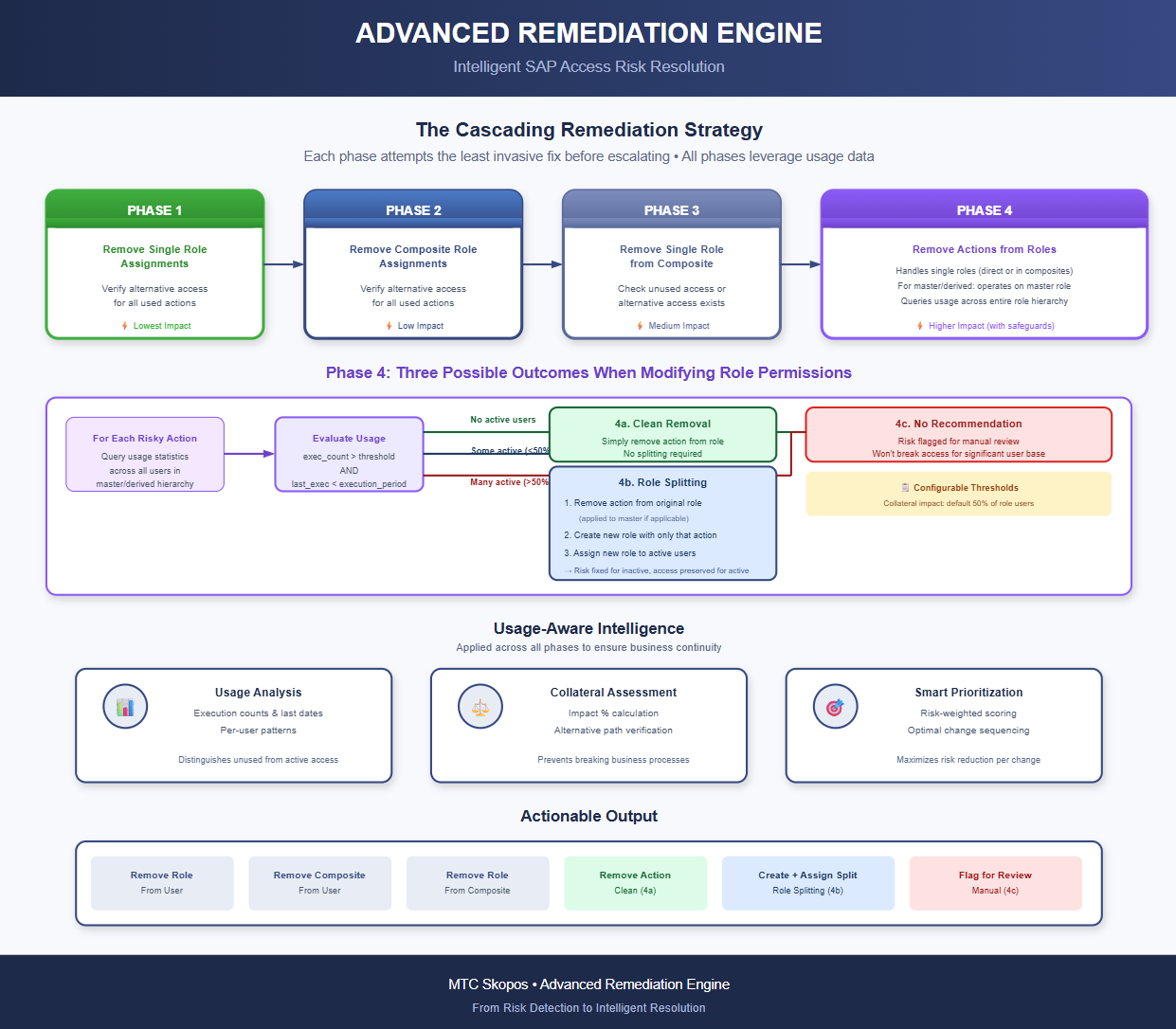
Phase 1: Remove Single Role Assignments
For each user, the engine identifies directly assigned single roles that contain risky actions. It then scores these roles based on two factors:
- How many risky actions they contain (higher = more attractive to remove)
- How many used actions they provide (lower = safer to remove)
Before removing a role, the engine verifies that every action the user actively uses from that role is also available through another assigned role (either direct or via composite). If so, the role assignment is removed. If not, the role is marked as "not removable at this phase" and passed to the next phase.
Phase 2: Remove Composite Role Assignments
Same logic, applied to composite roles. The engine checks whether the user has alternative paths to all actively used actions provided by the composite role. Composite roles are scored and processed in order of highest risk reduction with lowest business impact.
Phase 3: Remove Single Roles from Composite Roles
At this point, we've handled what we can at the user level. Now we look at modifying role structures.
For each composite role that couldn't be removed in Phase 2, the engine evaluates its member single roles. A single role can be removed from a composite if:
- The role's usage is below the usage threshold (low execution count AND last execution older than the configured execution period), OR
- All users who actively use actions from that single role have alternative access to those actions through other roles
This is a broader change since it affects all users assigned to the composite, so the engine checks collateral impact before proceeding.
Phase 4: Remove Actions from Roles
When role-level changes aren't sufficient, we look at modifying the permissions within roles themselves. This phase handles both single roles assigned directly and single roles nested within composite roles.
For roles using master/derived role architecture, the engine operates on the master role (since that's where the authorization data lives) while tracking which derived role triggered the analysis.
For each risky action, the engine queries usage statistics across all users assigned to the role (or to any derived role belonging to the same master). Three outcomes are possible:
4a. Clean Removal (no active usage)
If no user across the entire role hierarchy is actively using the action, meaning usage is below the defined usage threshold AND the last execution predates the defined period, the action is simply removed from the role. No splitting required.
4b. Role Splitting (some active usage, within collateral threshold)
If some users are actively using the action, but they represent a small enough percentage of total role assignments (configurable, default 50%), the engine generates a role split:
- Remove the action from the original role (applied to master role if applicable)
- Create a new single role containing only that action
- Assign the new role to each user who was actively using the action
4c. No Recommendation (too much active usage)
If active users exceed the collateral impact threshold, the engine does not generate an automatic recommendation. The risk remains flagged but requires manual review, we're not going to propose breaking access for a significant portion of the user base.
Configuration
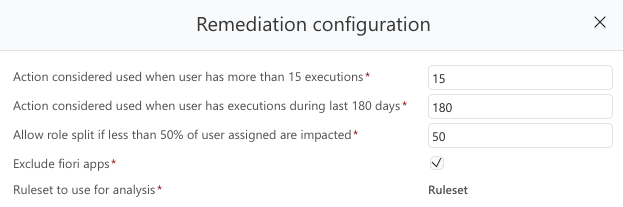
The parameters a direct impact on potential business disruptions. Different organizations have different policies, so we made the key thresholds configurable.
The Role of Usage Data
This is really what makes the whole thing work. Without knowing who actually uses what, you're just guessing. In MTC Skopos, usage data can consist of execution count and/or action involved in changelog, to cover the full spectrum.
The engine looks at:
- How many times each transaction has been executed
- When it was last used
- Which users are using it and how heavily
We classify access into two buckets:
- Unused: Hasn't been used in months (configurable, default is 180 days)
- Used/Required: Action is deemed required if a user has executed the action more than X times
Unused access is the low-hanging fruit. It's risk without business value, the user has the capability but isn't using it. These are prime candidates for removal.
Active access is trickier. You can't just remove it without consequences, so the engine either finds alternative ways to resolve the risk or generates the role-splitting recommendations described above.
Avoiding Collateral Damage
One thing we were particularly concerned about was making recommendations that would inadvertently break things for other users.
Before the engine recommends modifying a role (rather than just a user assignment), it calculates how many other users would be affected. If too many users would lose access they're actively using, the recommendation is suppressed or flagged for manual review.
There's a configurable threshold for this, by default, if more than 50% of the role's users are actively using the transaction we'd be removing, we don't recommend the change automatically.
Validation Through Simulation
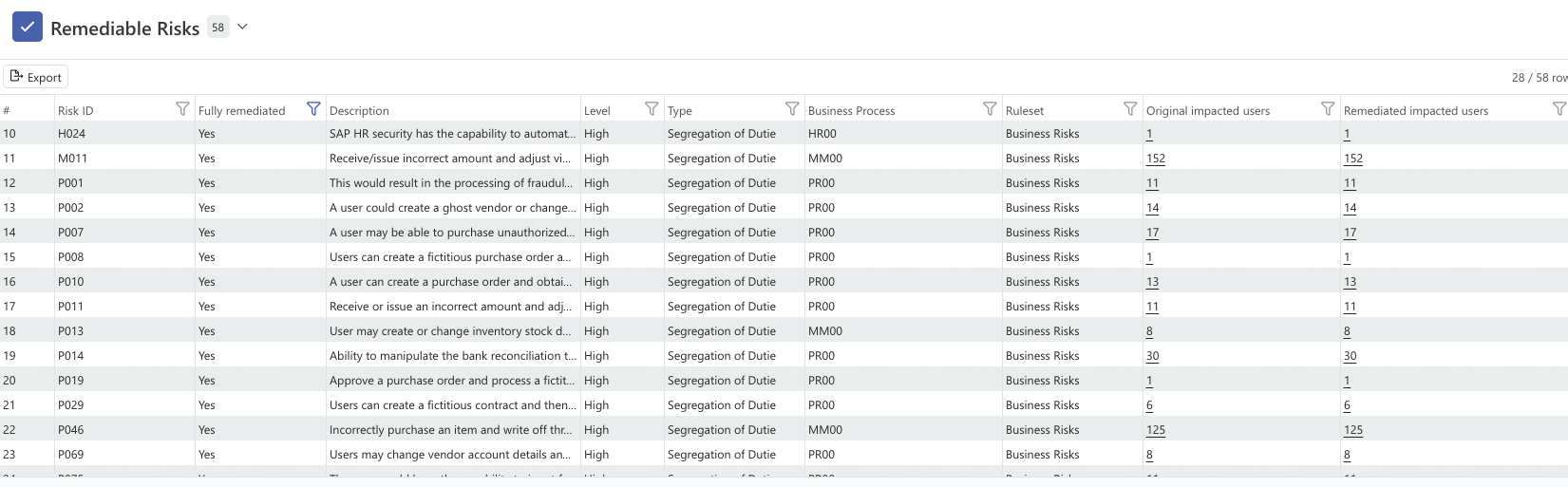
One thing we built in from the start is the ability to validate recommendations before implementing them. The engine can translate its recommendations into simulation criteria and run a "what-if" analysis.
This lets you:
- Generate the remediation plan
- Simulate applying all the changes
- Verify the targeted risks are actually eliminated
- Check that no new risks are introduced
- Then implement with confidence
We advise to validate the recommendation before implementing them.
What the Output Looks Like
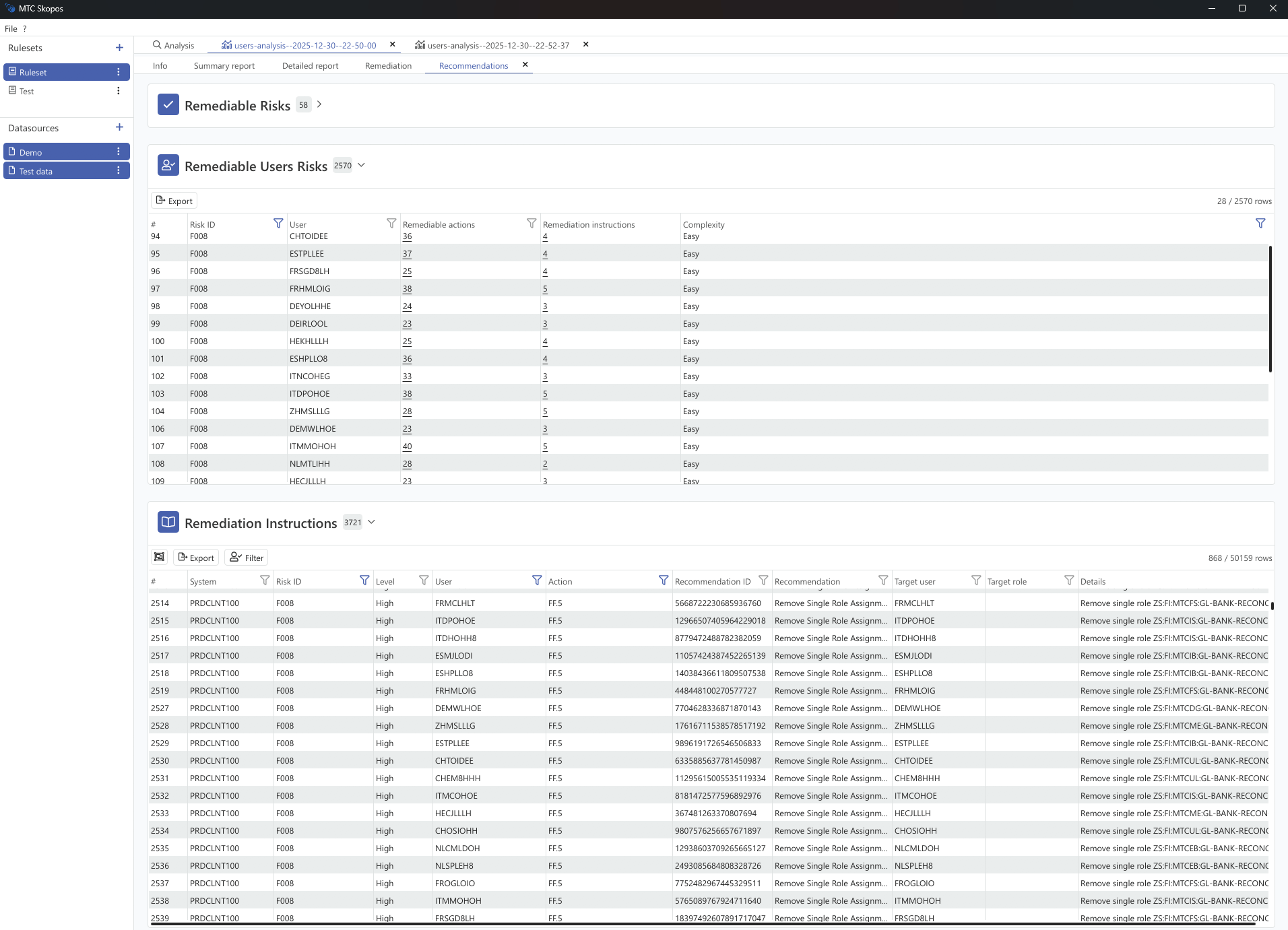
The engine generates specific, actionable recommendations. Not "consider reviewing this role" but concrete steps:
- Remove role
Z_MM_BUYERfrom userJSMITH- Remove
Z_PO_CREATEfrom composite roleZ_PROCUREMENT_ALL- Remove transaction
ME21Nfrom roleZ_MM_PURCHASING- Create new role
ME21N_SPLITwith transactionME21N- Assign
ME21N_SPLITto usersALEEandBKIM
Each recommendation is tied to the specific risks it addresses, so you can trace back why it was generated.
Performance Notes
The engine uses parallel processing to handle large user populations. For a typical analysis of a few thousand users, you're looking at minutes rather than hours. Progress is reported in real-time, and long-running operations can be cancelled if needed.
Real-World Example
To make this concrete, here's what a typical run looks like on an anonymized production dataset:
Starting point:
- 847 active users across 312 single roles and 89 composite roles
- 12,340 SoD conflicts identified in the initial analysis
- 6 months of usage data (SM20/STAD + change documents)
Engine execution: 4 minutes 12 seconds
Results:
| Phase | Action | Conflicts Resolved |
|---|---|---|
| Phase 1 | Removed 194 single role assignments (unused) | 4,218 (34.2%) |
| Phase 2 | Removed 31 composite role assignments | 1,851 (15.0%) |
| Phase 3 | Removed 47 single roles from composites | 1,605 (13.0%) |
| Phase 4a | Removed 83 unused actions from roles | 892 (7.2%) |
| Phase 4b | Generated 12 role splits | 448 (3.6%) |
Total automated resolution: 9,014 conflicts (73.1%)
The remaining 3,326 conflicts (26.9%) were flagged for manual review. Most of these involved heavily used transactions where the collateral impact threshold was exceeded, exactly the kind of decisions that need human judgment and business context.
After simulating the proposed changes, the engine confirmed zero net-new risks introduced and no active access broken for any user.
The entire remediation plan, including the 194 role removals, 47 composite modifications, 83 action removals, and 12 role splits, was exported as a step-by-step action plan ready for implementation.
Impact on Consulting Engagements
This has meaningfully changed how we approach remediation projects.
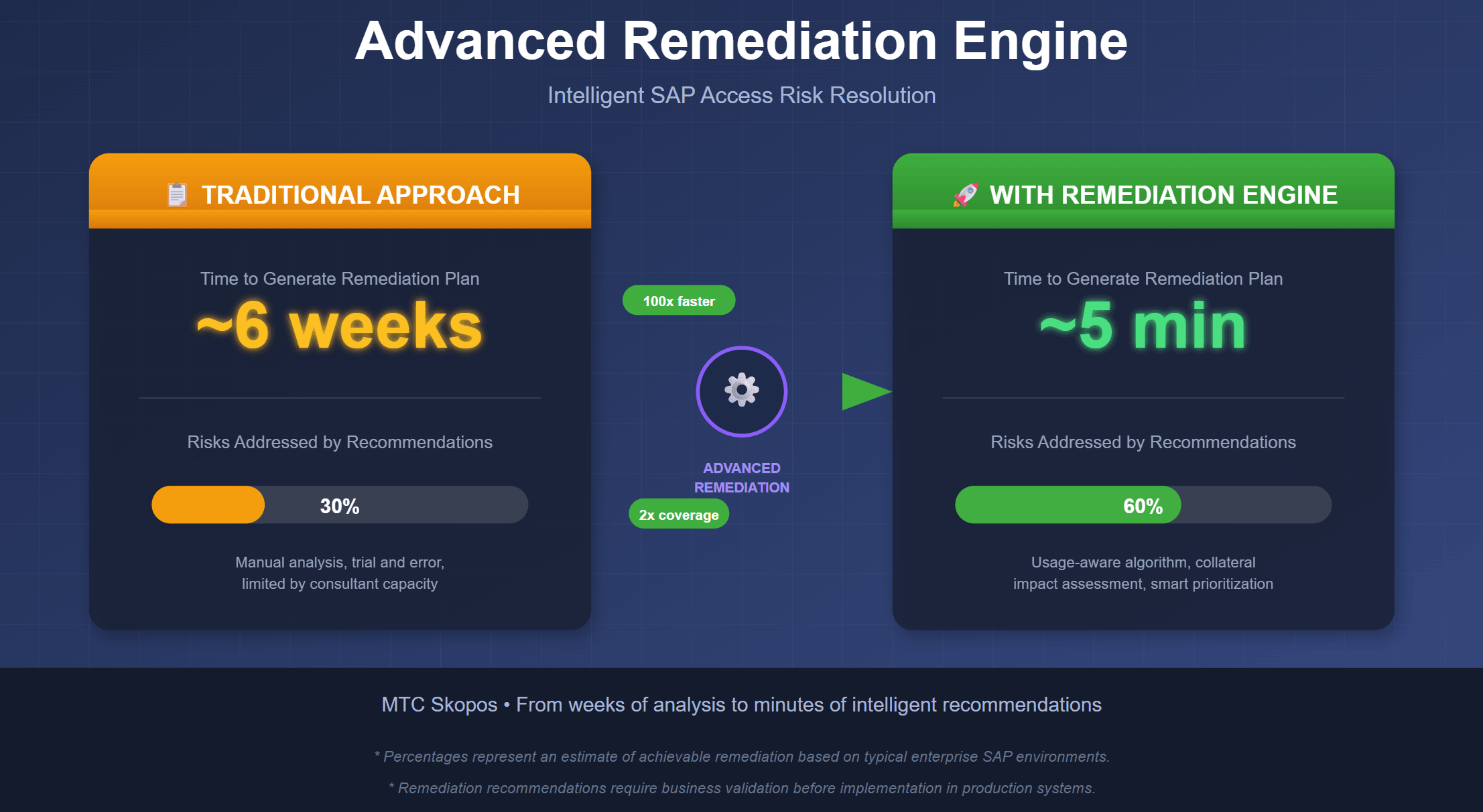
The technical analysis that used to consume weeks of a project, identifying which changes would resolve which conflicts without breaking anything, now takes minutes. The algorithm handles the heavy lifting of working through thousands of user-role-action combinations and produces a concrete remediation plan.
What this means in practice: for the same project budget, consultants can reallocate time from tedious technical analysis to work that actually requires human judgment. Instead of spending days in spreadsheets figuring out which role to modify, that time goes toward:
- Working with business process owners to understand why certain access patterns or usage behavior exist
- Evaluating whether a risk should be remediated or mitigated based on business context
- Designing and documenting mitigating controls for risks that can't be cleanly removed
- Helping organizations build sustainable access governance processes
The remediation plan becomes a starting point for conversation, not the end product of weeks of analysis. A consultant can walk into a stakeholder meeting with specific recommendations already generated and spend the meeting discussing business implications rather than explaining what a transaction does.
It also makes iterative approaches more feasible. When generating a remediation plan takes minutes instead of weeks, you can afford to run multiple scenarios, "what if we remediate only critical risks?", "what if we exclude this department?", and compare the results.
Wrapping Up
This isn't a magic solution that fixes everything automatically. Complex situations still need human judgment. But for the bulk of straightforward SoD conflicts, especially those involving unused or redundant access, it can generate a solid remediation plan in a fraction of the time it would take to do manually.
The goal was to shift the work from "figure out what to change" to "review and approve what we're proposing", and free up consultants or corporate authorization teams to focus on the business questions that need their expertise.
Related Articles
- Best SAP SoD Tools & Software Compared - Compare the leading SoD analysis solutions
- SoD Conflicts in SAP: How to Detect and Resolve Them - Practical guide to SAP SoD conflict resolution
- Understanding Did-Do Analysis for SAP Access Risk - When remediation isn't possible, monitor with did-do analysis
- Building an SoD Ruleset for S/4HANA - Build the ruleset that drives remediation analysis
Ready to experience the difference? [Learn more about MTC Skopos] or [contact our team] to schedule a demonstration.