
From Risk to Reality: How Did-Do Analysis Transforms SoD Compliance
Organizations invest significant resources identifying Segregation of Duties (SoD) violations in their SAP environments. Traditional SoD analysis answers a critical question: "Who has conflicting access that could enable fraud?" But this only tells half the story.
The real compliance question auditors and risk managers need answered is: "Did users with risky access actually use it to make changes?"
This is where the Did-Do feature bridges the gap between theoretical risk and actual risk materialization through intelligent access violation monitoring.
What is Did-Do Analysis?
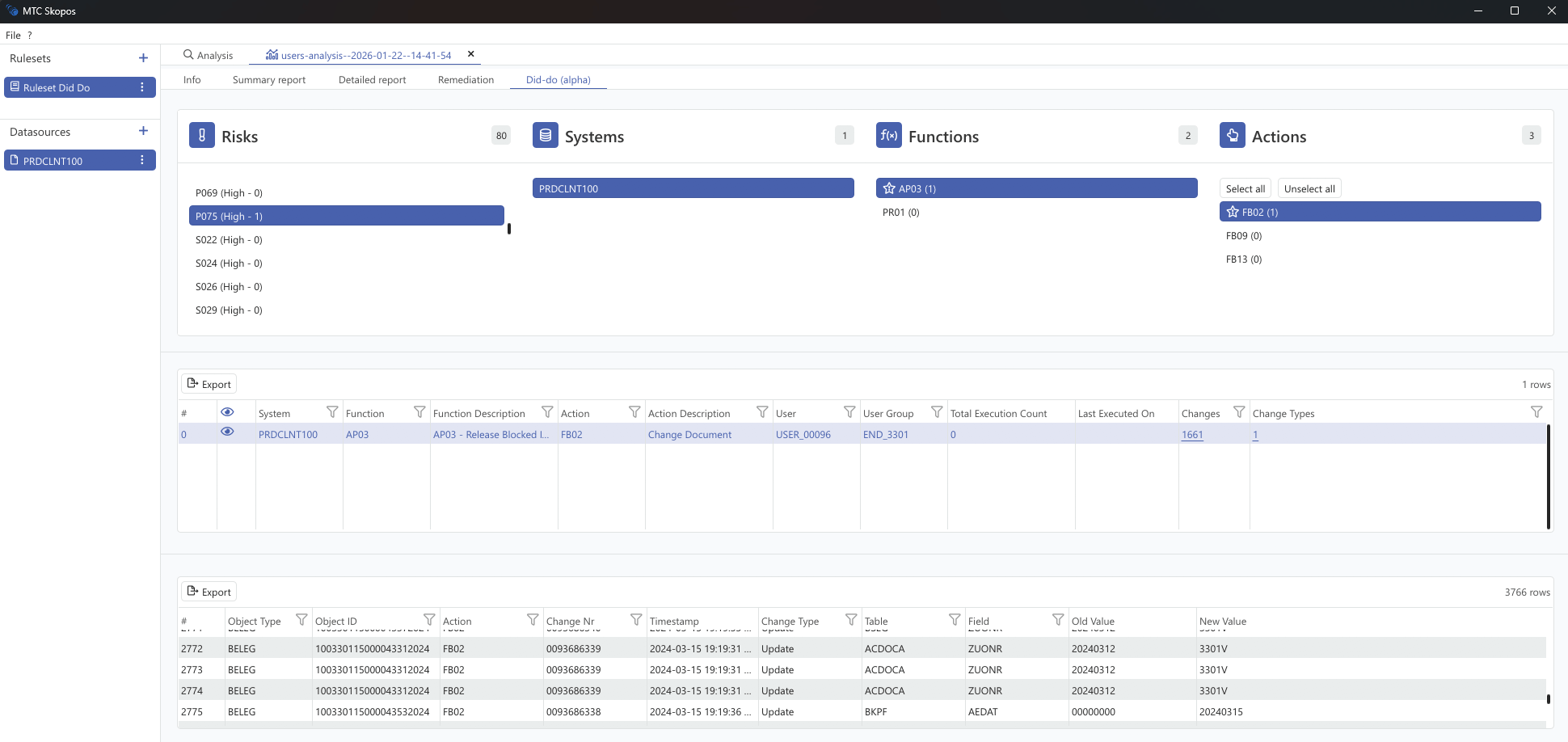
The Did-Do feature is an advanced audit capability that correlates access risk findings with actual change documents. The name captures its essence perfectly:
- "Did" = Users were granted risky access (identified through SoD violation analysis)
- "Do" = Users actually made changes using that risky access (confirmed through change documents)
- Did-Do Analysis = The correlation proving whether granted risky permissions resulted in actual modifications to master data or transactional data
Rather than presenting auditors with a list of potential risks, Did-Do analysis provides concrete evidence of risk materialization. It can also demonstrate that certain identified risks remained dormant, with no actual changes recorded.
Execution Count vs. Did-Do: A Critical Distinction
One of the most important concepts to understand is the difference between transaction execution and actual data changes. Many access violation monitoring approaches confuse these two metrics, leading to inaccurate risk assessments.
Transaction Execution Count
The execution count tells you how many times a user opened a transaction. This data typically comes from the SAP Statistical Records (STAD) or similar usage logs. However, opening a transaction does not mean the user made any changes.
A user might:
- Open a maintenance transaction just to view data
- Start a process but cancel before saving
- Use a change transaction for lookup purposes only
For example, a user could execute MM02 (Change Material) 100 times but never actually modify a single material record. The execution count would show 100, but the actual risk exposure is zero.
Did-Do Analysis: Change Document Evidence
Did-Do analysis goes deeper by examining SAP's change document tables (CDHDR and CDPOS). These tables record only when actual modifications occur to master data or transactional data. This is the difference between:
- Execution Count: "User opened transaction ME21N 50 times"
- Did-Do: "User created 23 purchase orders, modifying fields X, Y, and Z"
This distinction is critical for accurate access violation monitoring and risk assessment.
Why This Matters for Risk Assessment
Consider a user with an SoD violation involving vendor maintenance and payment processing:
| Metric | Vendor Maintenance (XK02) | Payment Processing (F110) |
|---|---|---|
| Execution Count | 200 | 150 |
| Change Documents | 0 | 0 |
Based on execution count alone, this user appears highly active in both conflicting functions. But the Did-Do analysis reveals zero change documents. The user was opening these transactions to display information, not to make changes.
The risk has not materialized. This user does not require immediate remediation from a risk realization perspective.
Assessing Risk Realization
A fundamental question in SoD mitigation is: "Did the risk actually realize?"
Traditional SoD analysis identifies potential risks based on access permissions. But potential risk and realized risk are very different:
- Potential Risk: User has access to create vendors AND process payments
- Realized Risk: User actually created a vendor AND processed a payment to that vendor
Did-Do analysis directly answers whether the risk realized by checking for change documents in both conflicting functions. If a user has the SoD violation but has zero change documents in one or both functions, the risk remains theoretical.
This assessment helps organizations:
- Prioritize remediation on users where both functions show actual changes
- Justify mitigating controls for users where the risk has not materialized
- Provide audit evidence that certain SoD violations did not result in actual fraudulent activity
How Does It Work?
The Technical Foundation
The Did-Do feature operates by correlating two distinct data sets:
- SoD Violation Data: The output of ruleset-based analysis that identifies users with conflicting access permissions
- Transaction Change Logs: SAP's CDHDR (Change Document Header) and CDPOS (Change Document Items) tables that record every modification made in the system
The Correlation Process
When analyzing a risk, the system follows a systematic approach:
Step 1: Extract Risk Context
For each identified SoD violation, the system identifies:
- Which users have the risky access
- Which roles grant that access
- What specific actions (transaction codes) are involved
- What object types could be affected
Step 2: Query Change Documents
The system searches the change document tables for evidence that users actually made modifications. This includes:
- Standard transaction codes (e.g., ME21N for creating purchase orders)
- SAP Fiori application activities
- Changes to specific object types (materials, vendors, financial documents)
Step 3: Intelligent Action-Type Handling
The system recognizes that different action types leave different audit trails:
- Standard Transactions: Look up by transaction code in change logs
- Fiori Applications: Look up by object type (Fiori apps don't always record traditional transaction codes)
Step 4: Multi-Level Flagging
Results are flagged at multiple levels:
- Risk Level: Did ANY user make changes using ANY conflicting action?
- Function Level: Which specific business functions show evidence of changes?
- Action Level: Which exact transactions resulted in modifications?
Configuring Did-Do in the Ruleset
For Did-Do analysis to work, the ruleset must define which change documents to look for when evaluating each action. This configuration happens at the function-action level within the ruleset.
Change Document Configuration
For each action in a function, you can specify two key attributes:
| Attribute | Description | Example |
|---|---|---|
| Change Document Transaction | The transaction code(s) that create change documents | ME21N, ME22N, ME23N |
| Change Document Object Type | The SAP change document object class | EINKBELEG, MATERIAL, KREDITOR |
How It Works in Practice
Consider a function "Maintain Vendor Master" with action XK02 (Change Vendor):
Function: Maintain Vendor Master
└── Action: XK02 (Change Vendor)
    ├── Change Doc Transaction: XK02
    └── Change Doc Object Type: KREDITOR
When the system performs Did-Do analysis for this action, it queries the change document tables (CDHDR) looking for:
- Records where the transaction code matches XK02
- Records where the object class is KREDITOR (vendor master)
- Records created by users who have this SoD violation
Multiple Transactions per Action
Some actions may involve multiple transaction codes that create the same type of change. For example, a "Create Purchase Order" action might include:
Function: Create Purchase Orders
└── Action: Create PO
    ├── Change Doc Transactions: ME21N, ME21, MIGO
    └── Change Doc Object Type: EINKBELEG
The system will search for change documents from any of these transactions, providing complete coverage of the action.
Object Type Filtering
The change document object type acts as a filter to ensure only relevant changes are counted. SAP uses specific object classes in table CDHDR:
| Object Type | Description |
|---|---|
| KREDITOR | Vendor Master |
| DEBITOR | Customer Master |
| MATERIAL | Material Master |
| EINKBELEG | Purchasing Documents |
| VERKBELEG | Sales Documents |
| BANF | Purchase Requisitions |
| FIPEX | Commitment Items |
By specifying the object type, the system avoids false positives from unrelated transactions that happen to share a transaction code.
Fiori Application Configuration
For SAP Fiori applications, the configuration differs slightly. Fiori apps often do not record a traditional transaction code in the change documents. Instead, the system looks up changes by object type only:
Function: Manage Materials (Fiori)
└── Action: Manage Material App
    ├── Change Doc Transaction: (empty)
    └── Change Doc Object Type: MATERIAL
When the transaction field is empty, the system searches for any change documents of the specified object type where no transaction code was recorded, which is characteristic of Fiori-based changes.
Why Ruleset Configuration Matters
The accuracy of Did-Do analysis depends entirely on correct ruleset configuration:
- Missing transaction codes will result in under-counting changes
- Wrong object types will either miss relevant changes or include irrelevant ones
- Incomplete coverage means some user activity goes undetected
A well-maintained ruleset ensures that Did-Do analysis provides reliable evidence for compliance decisions.
What Information Does Did-Do Provide?
User-Level Analysis
For each user with risky access, the Did-Do analysis reveals:
| Data Point | Business Value |
|---|---|
| Change Count | How many actual modifications were made? |
| Last Changed On | When was the most recent change? |
| Object Types Changed | What kinds of master data or documents were affected? |
| Specific Changes | Drill-down to individual change records with field-level detail |
Role-Level Analysis
When analyzing from a role perspective:
| Data Point | Business Value |
|---|---|
| Users with Changes | Which users assigned to this role actually made modifications? |
| Aggregated Activity | Total change volume across all users |
| Per-User Breakdown | Individual contribution to the risk picture |
Field-Level Drill-Down
For detailed investigations, auditors can drill down to see:
- Exact fields that were modified
- Old values vs. new values
- Timestamps and change document numbers
- Complete audit trail for forensic analysis
Business Benefits for SoD Mitigation
1. Risk Prioritization Based on Evidence
The Challenge: Traditional SoD analysis can generate thousands of violations. Which ones deserve immediate attention?
The Solution: Did-Do analysis enables risk-based prioritization. A user with conflicting access who has never made changes presents a different risk profile than one who has modified records 500 times in the past quarter. Remediation efforts can focus where evidence shows actual changes occurred.
2. Accurate Risk Realization Assessment
The Challenge: Auditors ask "Did the risk materialize?" but execution counts alone cannot answer this question.
The Solution: Did-Do analysis provides definitive evidence of whether an SoD risk resulted in actual data modifications. This directly answers the risk realization question with change document proof.
3. User Training Opportunities
The Challenge: Some users have maintenance transaction access but only need to view data, creating unnecessary SoD exposure.
The Solution: Did-Do analysis reveals users who execute maintenance transactions (high execution count) but never make changes (zero change documents). These users should be trained to use the appropriate display transactions instead.
For example:
- User executes MM02 (Change Material) 200 times with 0 change documents
- Recommendation: Train user to use MM03 (Display Material) instead
- Result: The SoD violation can be removed without impacting the user's work
This approach reduces SoD exposure while improving user efficiency.
4. Reduced False Positive Fatigue
The Challenge: Security teams often suffer from alert fatigue when presented with endless lists of potential violations, many of which are theoretical.
The Solution: By showing which risks have materialized through actual changes, Did-Do analysis separates signal from noise. Teams can deprioritize dormant risks while escalating active threats.
5. Enhanced Audit Evidence
The Challenge: Auditors need concrete evidence, not just possibility reports.
The Solution: Did-Do provides exportable evidence showing exactly who changed what, when, and to which objects. This documentation satisfies SOX compliance requirements and supports both internal and external audit processes.
6. Smarter Remediation Decisions
The Challenge: Role redesign is expensive and disruptive. How do you justify the investment?
The Solution: Did-Do analysis informs remediation strategy:
- Risks with zero changes may be candidates for monitoring controls rather than immediate role redesign
- Highly active risks with many change documents demand immediate remediation
- Evidence supports business case development for authorization projects
7. Continuous Access Violation Monitoring
The Challenge: Point-in-time audits miss ongoing risk evolution.
The Solution: Regular Did-Do analysis creates a continuous view of how risks are being exercised over time. Trending data reveals whether remediation efforts are working or if new risk patterns are emerging.
8. Mitigating Control Validation
The Challenge: When SoD conflicts cannot be immediately resolved, compensating controls are implemented. But are they effective?
The Solution: Did-Do analysis validates whether mitigating controls are working. If a conflict exists but no changes occur (because a detective control is catching them), the Did-Do data confirms the control's effectiveness.
Real-World Scenario: Procurement Fraud Risk
Consider a classic SoD violation: "Maintain Vendor Master + Create Purchase Orders"
Traditional analysis identifies 15 users with this conflict. Without Did-Do analysis, the compliance team must treat all 15 as equally risky.
With Did-Do analysis, the picture becomes clearer:
| User | XK02 Execution | Vendor Changes | ME21N Execution | PO Changes | Risk Realized? |
|---|---|---|---|---|---|
| User A | 50 | 0 | 30 | 0 | No |
| User B | 10 | 3 | 300 | 245 | Partial |
| User C | 100 | 12 | 20 | 0 | Partial |
| User D | 80 | 47 | 400 | 312 | Yes |
| User E | 200 | 0 | 150 | 0 | No |
Key observations:
- User A and User E have high execution counts but zero change documents. They are using maintenance transactions for display purposes. Recommendation: Train them to use display transactions and remove maintenance access.
- User B and User C have changes in only one function. The SoD risk has not fully materialized.
- User D has change documents in both functions. The risk has realized. This user demands immediate investigation.
Integration with the Broader Compliance Framework
Did-Do analysis enhances traditional SoD analysis. The combined approach creates a mature access violation monitoring posture:
- SoD Analysis identifies who CAN perform conflicting actions
- Did-Do Analysis reveals who actually MADE CHANGES using those actions
- Risk Realization Assessment determines which violations resulted in actual modifications
- Training Identification finds users who should switch from maintenance to display transactions
- Risk Prioritization ranks violations by evidence of actual changes
- Remediation Planning allocates resources where risks have materialized
This evidence-based approach ensures that compliance investments deliver maximum risk reduction.
Conclusion
The Did-Do feature transforms SoD compliance from a theoretical exercise into an evidence-based practice. By answering the question "Did users with risky access actually make changes?", organizations gain:
- Clarity on which risks have materialized versus which remain theoretical
- Accuracy in distinguishing transaction execution from actual data modifications
- Efficiency in prioritizing remediation efforts based on change document evidence
- Training opportunities to move users from maintenance to display transactions
- Evidence for audit and compliance reporting on risk realization
- Confidence that resources are focused on risks that have actually materialized
In an environment where compliance budgets are finite and audit scrutiny is increasing, Did-Do analysis provides the intelligence needed to make smarter decisions about SoD risk management. Access violation monitoring must go beyond execution counts to examine what users actually changed.
The future of GRC is evidence-based. Did-Do analysis delivers that evidence.