
The remediation engine takes an analysis result and works out what would actually clear each risk without breaking the people who hold the access. It needs a users analysis, because the decisions it makes depend on who uses what.
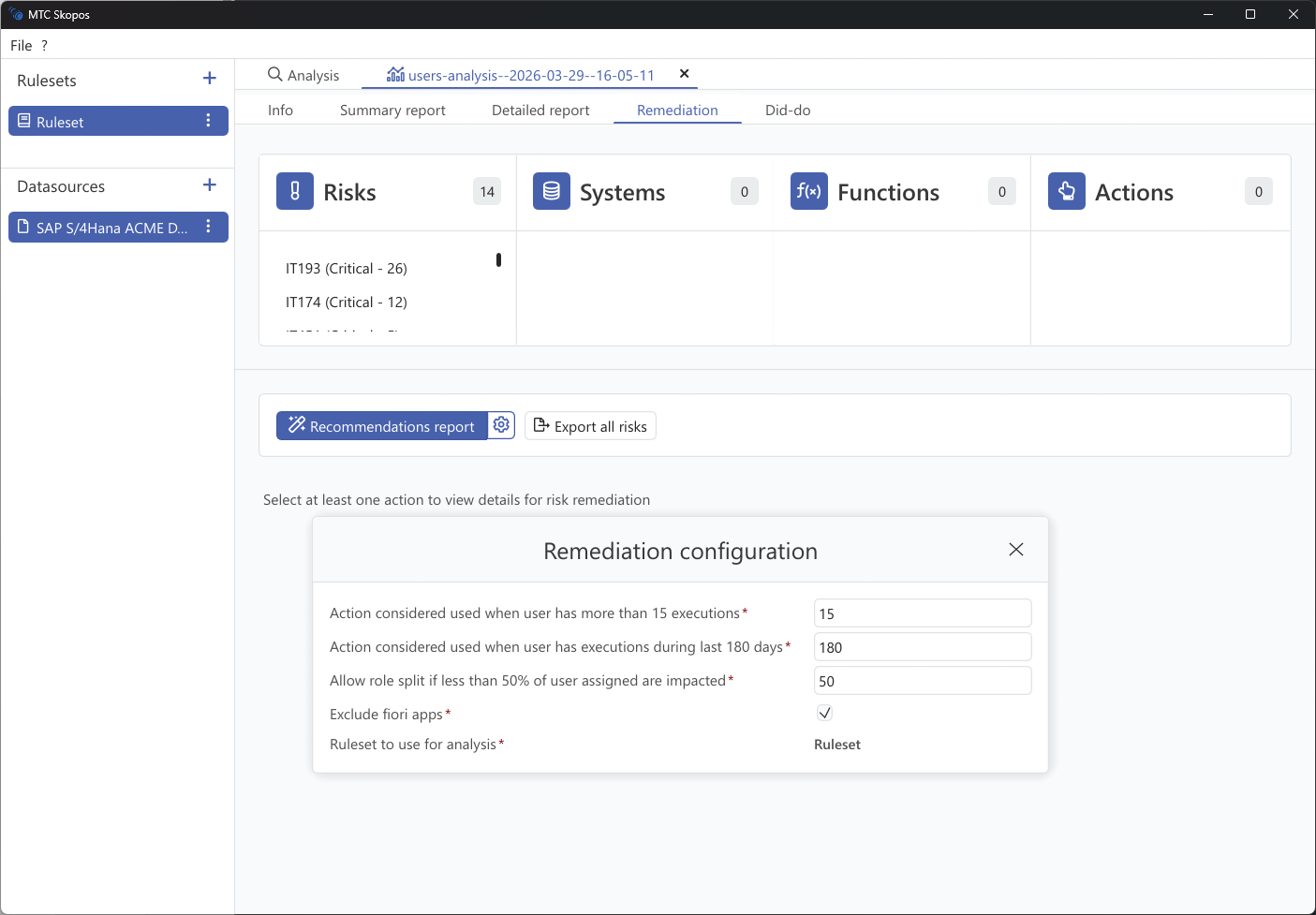
Steps
- Run a users analysis
- Go to Remediation
- Click the gear icon next to "Recommendations report" to open the configuration
- Adjust the parameters described below
- Select at least one risk, system, function, or action to scope the remediation
- Click Recommendations report
Scoping is mandatory rather than a convenience. A landscape-wide remediation run on a large system produces a report nobody works through, so the engine asks you to name what you are fixing.
Configuration
These settings decide where the line falls between access that is in use and access that is merely assigned. That single judgement drives almost everything the engine proposes.
| Setting | Default | What it does |
|---|---|---|
| Execution count threshold | 15 | An action counts as used when it has been executed more than this many times. At or below, it is treated as unused and becomes a candidate for removal |
| Execution recency (days) | 180 | An action counts as used when it was last executed within this many days. Older than that, the access is treated as stale |
| Role split threshold (%) | 50 | Permits removing an action from a role only when more than this percentage of the role's assigned users are unaffected by the change |
| Exclude Fiori apps | Enabled | Leaves Fiori app authorizations out of the recommendations. Fiori usage data is frequently absent, and without it the engine cannot tell an unused app from an unmeasured one, so removal would be a guess |
| Ruleset to use for analysis | the loaded ruleset | The ruleset used to re-evaluate whether each proposed change actually clears the risk |
Tuning
- Start with the defaults, read the output, then adjust. The thresholds interact, so changing two at once makes it hard to tell which moved the result
- Raising the execution count threshold makes the engine bolder, because more access falls below the "used" line. Lowering it makes the engine more cautious
- Lowering the role split threshold permits role surgery that affects a larger share of a role's population. Raise it if you want the engine to leave shared roles alone
- If you have no usage data at all, the engine cannot distinguish used from unused access, and its output collapses to the structurally safe options only. Loading a usage table is the single biggest improvement you can make to remediation quality
How the engine searches
Options are evaluated cheapest-first, in three passes, and the engine keeps the least disruptive option that clears the risk:
- Remove a user's role assignment. Safest, because it changes one person and no shared object. Available when the user's remaining roles still cover the access they actually use
- Remove a single role from a composite. Changes the composite for everyone holding it, so it is only proposed when no holder loses access they use
- Remove an action from a role. Last resort, since it edits a shared object. Gated by the role split threshold
When none of the three clears the risk without stripping needed access, the engine proposes crafting a replacement role instead of forcing a removal, so a user can be moved onto a narrower role rather than losing capability.
What comes out
The report names concrete changes, each with a rationale and a complexity rating. See Understanding Recommendations for the full set of recommendation types and how to read them.