
Roles analysis asks a different question from users analysis. It ignores assignments entirely and evaluates whether a role, on its own, grants two conflicting capabilities. A conflict found here is a design defect: it will be reproduced on every user the role is ever assigned to, and it will keep coming back through provisioning until the role itself is corrected.
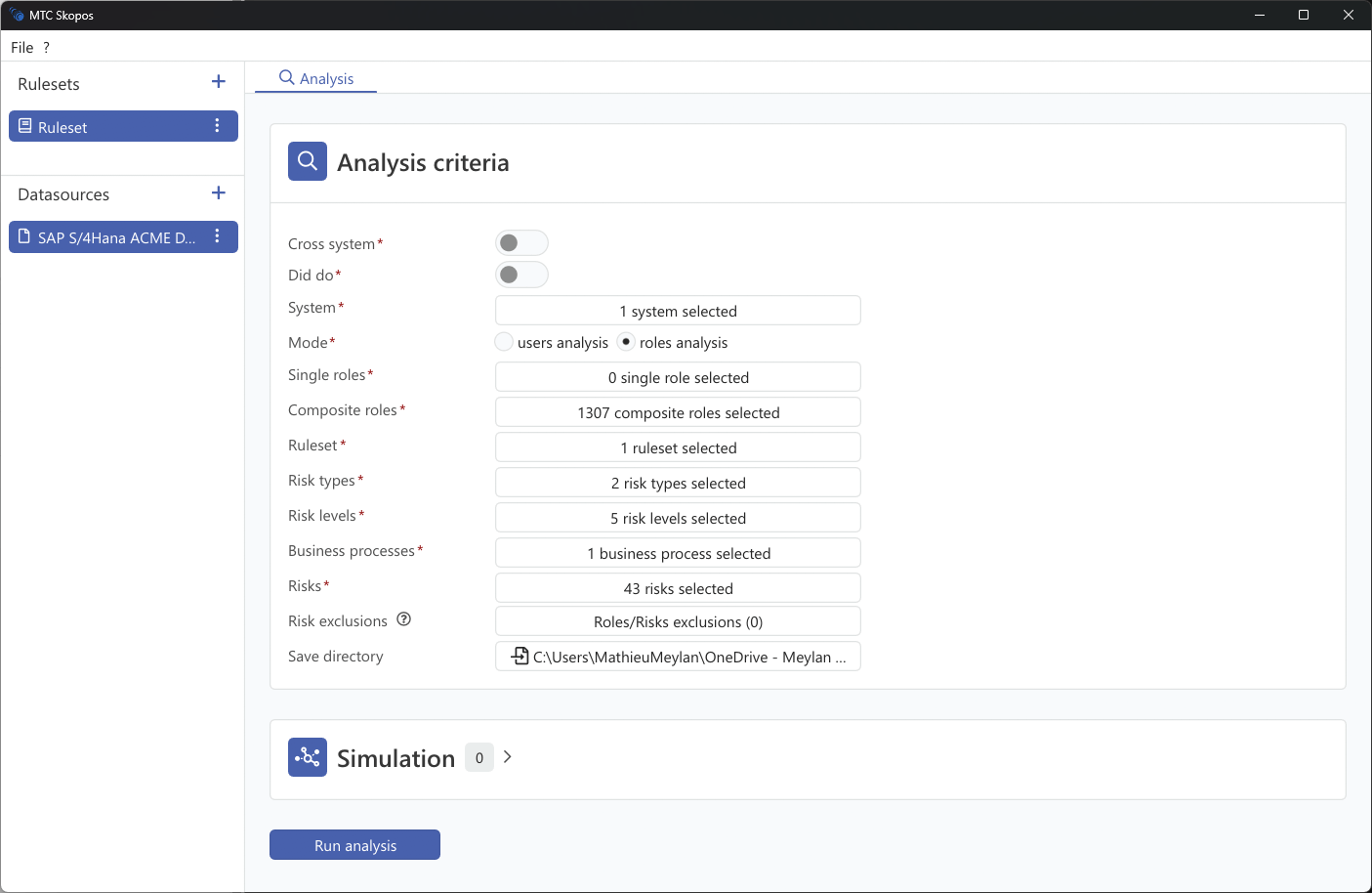
Steps
- Go to Analysis
- Select roles analysis mode
- Select one or more systems
- Select a ruleset
- Set the analysis criteria described below
- Click Run analysis
Analysis criteria
Criteria marked with a red asterisk are mandatory. There is no "leave it empty to include everything" behaviour: an unselected filter excludes everything, and the Run button stays disabled until every mandatory criterion has a selection. This is deliberate, because a silently unbounded run on a large landscape is rarely what anyone wants.
| Criterion | Effect |
|---|---|
| System | The data sources to analyze |
| Single roles | Restrict to specific single roles |
| Composite roles | Restrict to specific composite roles |
| Business roles | Restrict to IAM business roles, when IAM analysis is enabled |
| Ruleset | The ruleset used to evaluate risks |
| Risk types | Which risk types to evaluate |
| Risk levels | Which severities to evaluate |
| Business processes | Restrict to the processes in scope |
| Risk owners | Restrict to risks owned by specific owners |
| Risks | Restrict to specific risk IDs |
| Risk exclusions | Accepted role and risk combinations to leave out |
| Organisational scopes | Bind the organizational placeholders the ruleset declares. Only appears when the active ruleset uses them |
| Save directory | Where the analysis output is written |
The HR-based criteria available in users mode do not apply here, since a role has no department or location.
Simulation in roles mode
The Simulation panel offers three tabs in roles mode: Authorizations, Composite Roles, and New Roles. Two more appear when IAM analysis is enabled. This is where role design gets tested before it is built. See Role Simulation.
Reading the result
Results are keyed by role rather than by user, and the summary report carries Role Name, Role Description and Role Type in place of the user columns. See Report Types.
Which mode to use
Run both, for different purposes. Users mode tells you who has a conflict today and is what you need for certification and audit evidence. Roles mode tells you which role designs will keep generating conflicts, and is what you need to stop the problem recurring.
The practical sequence on a clean-up project is roles mode first, to find the designs worth fixing, then users mode to work through the population that still holds conflicts after the design changes land. Fixing assignments while leaving a conflicted role in place means doing the work again after the next provisioning round.