
Why Another GRC Tool? The Case for a Specialist Over a Suite
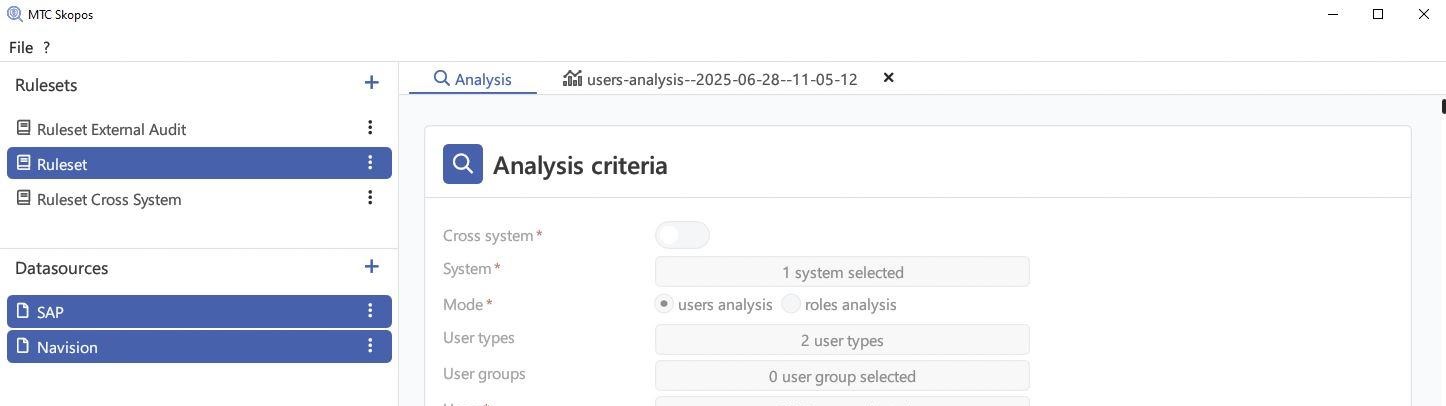
A specialist access risk tool earns its place when your problem is finding and fixing risk, not routing access requests. SAP GRC Access Control, Pathlock and Soterion bundle risk analysis together with provisioning, approval workflow and emergency access, so analysis depth competes for roadmap against three other modules. MTC Skopos does risk analysis only: detection at authorization-object level against a template ruleset of 1,150+ checks, a 10,000-user system analyzed in under 2 minutes on a standard laptop, and a remediation engine that proposes ordered changes rather than listing conflicts. It costs from €5,736/year for the base license, and it never provisions access. That last part is the trade you are making.
Why does a suite bundle four things you may not need?
SAP GRC Access Control is not one product. It is four modules sold together: Access Risk Analysis, Business Role Management, Access Request Management and Emergency Access Management. Pathlock and Soterion follow the same shape. The bundling makes sense for the vendor and often for the buyer, because a large organization genuinely does need request workflow and firefighter logging.
It stops making sense when you audit what you actually use. A great many SAP teams bought the suite for one reason, which was knowing where their SoD conflicts are, and are now maintaining infrastructure for three modules they never switched on. The feature-by-feature comparison shows where each suite draws its boundaries.
The second-order effect matters more than the license cost. When analysis is one module of four, its depth is capped by the roadmap it shares. Simulation stays basic. Execution data lands in a separate report instead of feeding the remediation decision. That is not vendor incompetence, it is what happens to any feature that is not the whole product.
What do you actually give up by choosing a specialist?
Worth stating plainly, because most comparison pages will not.
MTC Skopos does not provision access. It does not route approval requests, it does not manage firefighter IDs, and it never writes a change back to your system. It reads exported tables, computes risk locally, and hands you evidence and a plan. Somebody still has to make the change in PFCG. What that looks like in practice, with no GRC license and no production account, is on the SoD analysis without GRC or production access page.
If your business case is access request automation, no specialist analyzer replaces it and you should be comparing suites. If your business case is that nobody can tell you which of your 6,000 users can both create a vendor and pay it, you are buying the wrong thing when you buy the suite.
Plenty of teams run both, which is a legitimate outcome rather than a failure. The Skopos ruleset converts to SAP GRC format, so analysis work done now is not thrown away if a GRC project starts later.
Where does the depth go when analysis is the whole product?
Four places, concretely.
Detection resolves authorizations, not transaction codes. A transaction-level check asks whether a user holds MIRO and F110. An authorization-level check asks whether the underlying objects and field values actually permit the action, in the company codes the user can reach. The difference between the two is the difference between a finding an auditor accepts and one your role owners spend a week disputing. The shipped template ruleset covers 350+ SoD risks, 700+ critical access checks and 100+ authorization quality checks, and it is a starting point to review and tune against your own authorization concept rather than something to switch on unread.
Scoping goes past the user list. Analysis can be bounded by organizational values, HR structure or audit perimeter, which is what makes a result reviewable by the business rather than by the security team alone. Cross-entity access is usually where the interesting findings sit, not in the textbook SoD pairs.
Execution data feeds the decision. Knowing a user could post a journal entry is a different claim from knowing they did it 400 times last quarter, and the second one changes what you remediate first. The Did-Do add-on joins usage history to the theoretical risk so the two are read together.
Remediation proposes an ordered plan. The engine has tunable thresholds and returns a sequence of role changes with impact analysis on other users, not a spreadsheet of violations. That is covered in more depth in the remediation write-up.
How fast is fast enough to change how you work?
Speed sounds like a vanity metric until it crosses the threshold where analysis stops being a batch job.
A full 10,000-user system completes in under 2 minutes on a standard laptop. A typical 2,500-user system finishes in under 10 seconds*. A single user check returns in under a second. Extraction is 5 to 10 minutes by manual table export, or 1 to 5 minutes over RFC, which puts the whole path from extraction to findings inside 15 minutes.
The point is not the number. It is that at that speed you can re-run analysis after every proposed role change and see the result before the meeting ends, which is a different activity from scheduling a quarterly report.
* Benchmark condition: 150+ high and critical SoD risks in scope. Hardware dependent.
What does it cost, and what is not included?
The base license is €5,736/year and includes one seat, with additional seats at €555 each. One license covers unlimited systems and users analyzed, so cost does not grow with your landscape. Every suite in this category prices per user or per monitored system and none of them publish a rate.
Several capabilities are paid add-ons rather than part of the base license, and it is worth being exact about which: the remediation report (€2,398/year), Did-Do analysis (€1,678), what-if simulation (€1,199), cross-system analysis (€1,199) and IAM business role analysis (€988). The full bundle is €13,198/year. The pricing page carries the complete list.
When should you not pick a specialist?
If you need provisioning or emergency access management, buy the suite. If your governance model requires approval workflow inside the same tool that detects the risk, buy the suite. If you have no SAP authorization knowledge in-house at all, a ruleset template will not save you, because tuning it to your authorization concept is the work that makes the output trustworthy.
And if you already own SAP GRC and are still shopping, the reason is usually not what you think it is.
Related Articles
- SAP Access Risk Analysis Tool - what the analysis engine detects and how it runs
- SAP GRC Alternatives Compared - feature matrix across MTC Skopos, Pathlock, Soterion, Access Informer and CheckAud
- 13 SAP SoD Tools Compared - the full narrative comparison guide
- We Built a Desktop SoD Tool in 2024 - why the deployment model looks the way it does
Want to see it against your own data? Explore the features or get in touch.