
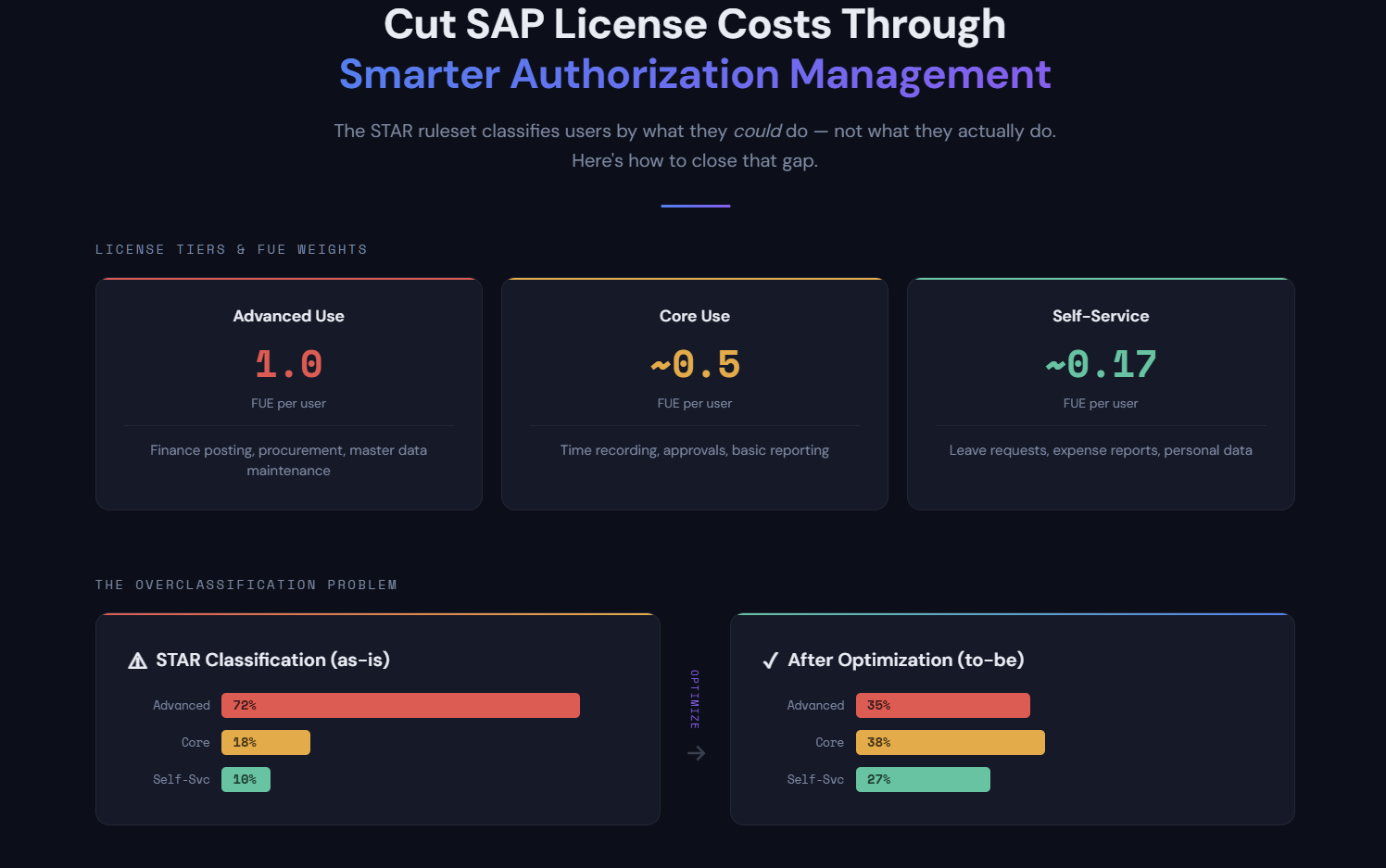
SAP FUE Optimization: Cut License Costs Through Smarter Authorization Management
SAP FUE optimization is the process of reducing Full Use Equivalent license consumption under RISE with SAP by aligning user authorization profiles with actual business needs. Because SAP classifies users into costly license tiers based on assigned authorizations rather than actual usage, organizations typically see 50-150% FUE inflation that can be eliminated through systematic authorization analysis and role cleanup.
When SAP introduced the Full Use Equivalent (FUE) model for RISE with SAP and S/4HANA Cloud, it replaced the familiar named-user license types (Professional, Limited Professional, Employee) with a single pooled metric: FUE blocks. Each block gets consumed at different rates depending on what your users are authorized to do. The catch is that SAP determines those rates by looking at authorization assignments, not actual behavior.
The classification engine behind this is the STAR report (run via program SLIM_USER_CLF_HELP), which evaluates nearly 3,000 authorization object-field combinations and sorts each user into one of three tiers: Advanced Use, Core Use, or Self-Service. One Advanced-level authorization anywhere in a user's profile promotes their entire classification to the top tier. Most organizations that run the STAR report for the first time discover their FUE count is inflated by 50% to 150% compared to what actual usage would justify.
One documented case puts real numbers to the problem: a company with fewer than 100 professional users in ECC ran the STAR report and received an estimate requiring thousands of licenses under the FUE model. Had they submitted that report to SAP without remediation, they would have faced £4.5 million in unnecessary licensing costs.
The STAR ruleset has real gaps that make this worse. It doesn't cover every contractual license type definition. It doesn't differentiate between standard named-user access and engine-based consumption. And it measures what users could do based on their authorization profile, not what they actually do or even what they can execute given their transaction access. For organizations willing to do the analysis, those gaps are where the savings are.
This article explains how the FUE measurement model works, then walks through a systematic approach to FUE optimization using MTC Skopos - from initial classification analysis through to usage-based remediation.
Understanding the FUE measurement model
Before getting into optimization, it's worth understanding how FUE classification and measurement work under the hood.
FUE blocks: a pooled licensing metric
Under the FUE model, you don't buy individual user licenses. You purchase FUE blocks, and each user in your system consumes a portion of that pool based on their classification tier. The consumption ratios are:
| License Type | FUE Consumption | Ratio | Typical Activities |
|---|---|---|---|
| Advanced Use | 1.0 FUE per user | 1:1 | Full transactional access - finance posting, procurement, master data maintenance |
| Core Use | 0.2 FUE per user | 5:1 | Operational tasks - master data viewing, basic reporting, approvals |
| Self-Service | ~0.033 FUE per user | 30:1 | Employee self-service - leave requests, expense reports, personal data |
| Developer | 2.0 FUE per user | 0.5:1 | ABAP development, debugging, system configuration |
Look at those ratios. An Advanced user consumes 30 times as much of your FUE pool as a Self-Service user. Developers are even more expensive at 2 FUE each. Every user sitting in the wrong tier eats into your FUE budget.
Calculation example: An organization with 50 Advanced users, 200 Core users, and 500 Self-Service users would consume:
- Advanced: 50 x 1.0 = 50 FUE
- Core: 200 x 0.2 = 40 FUE
- Self-Service: 500 x 0.033 = ~17 FUE
- Total: ~107 FUE
If even 30 of those Advanced users were reclassified down to Core (because their authorization profiles don't reflect their actual work), the total drops to 83 FUE - a 22% reduction from a single remediation effort.
Named users vs. engine licensing
Most FUE discussions focus on named users. But there's a second dimension that trips people up: engine licensing.
Certain SAP modules and products aren't licensed by user count at all. Instead, they're licensed by business metrics - number of payroll runs, revenue processed, documents posted, or monitored users (as with SAP Access Control). These engine-licensed components consume FUE blocks based on their own metrics, and named users who access engine-licensed functionality can end up counted in both pools simultaneously.
This matters for FUE optimization because the STAR report doesn't cleanly separate named-user consumption from engine consumption. If your authorization analysis ignores which authorizations relate to engine-licensed modules, you might be optimizing the wrong part of your license position entirely.
How the STAR report classifies users
The STAR report (detailed in SAP Note 3113382) maps authorization profiles to license tiers. The process is mechanical:
- Reading each user's assigned roles and profiles
- Extracting all authorization objects and field values from those roles
- Matching those values against the STAR classification ruleset
- Assigning the highest matching license tier to each user
This is a ceiling-based approach. One authorization object value matching the Advanced tier promotes the entire user to Advanced - even if that authorization was inherited from a composite role, never used, or technically unexecutable because the user lacks access to any transaction that checks it.
SAP measures FUE consumption monthly under RISE contracts, and the highest monthly count during your contract period can become the billing baseline at true-up. The measurement is partly automated through SAP's Private Cloud metering tools, though some components (particularly engine usage) still rely on self-declaration. Your STAR results aren't a one-time audit artifact. They have recurring financial consequences every month your contract runs.
Step 1: Identify license types triggered by user roles
The first step in any FUE optimization is understanding your current position - which users are classified at which tier and why.
Import the STAR ruleset into MTC Skopos
The SAP STAR ruleset is a list of authorization object-field value combinations mapped to license types. Structurally, it's the same thing as a Critical Action ruleset - a set of rules that identify specific capabilities based on authorization assignments.
In MTC Skopos, you can import the STAR ruleset as a Critical Action ruleset:
- Download the STAR classification list from SAP Note 3113382
- Structure it as a Critical Action ruleset where each rule maps an authorization object + field value combination to its corresponding license type (Advanced, Core, Self-Service)
- Import the ruleset into MTC Skopos
Each rule in the STAR classification becomes an action in the ruleset. For example:
| Action ID | Description | Auth Object | Field | Value | License Type |
|---|---|---|---|---|---|
| ADV_FI_001 | Financial Document Posting | F_BKPF_BUK | ACTVT | 01, 02 | Advanced |
| ADV_MM_001 | Purchase Order Creation | M_BEST_BSA | ACTVT | 01, 02 | Advanced |
| CORE_HR_001 | Time Recording | P_TCODE | TCD | CAT2 | Core |
| SS_ESS_001 | Leave Request | P_TCODE | TCD | PTARQ | Self-Service |
Run the analysis
With the STAR ruleset loaded and your SAP user/role data extracted, run the Critical Action analysis in MTC Skopos. The output tells you:
- Per user: Which license type is triggered, and by which specific authorization(s)
- Per role: Which roles contain authorizations that trigger higher-tier classifications
- Distribution: How many users fall into each license tier
This gives you the baseline - your "as-is" FUE position before any optimization.
Identify quick wins
The initial analysis typically reveals several categories of overclassification:
- Users with a single Advanced authorization inherited from a broad composite role they don't need
- Roles containing wildcard values (e.g.,
ACTVT = *) that match Advanced-level activities the role was never intended to grant - Test or template users with full access profiles still active
- Departed employees or service accounts classified as full users
Step 2: Improve the STAR ruleset with your authorization concept
The standard STAR ruleset evaluates authorization objects in isolation. It doesn't consider whether those objects are actually linked to executable transactions or applications in your system. This is where SU24 data comes in.
Why SU24 matters for FUE optimization
Transaction SU24 (and its underlying tables USOBT_C and USOBX_C) defines which authorization objects are checked when a specific transaction code or application is executed. This is your system's authorization concept - the mapping between "what a user can launch" and "what authorization checks are performed."
The STAR ruleset checks authorization objects regardless of whether they're linked to any transaction the user can actually run. But in practice, an authorization object value only matters if:
- The user has access to a transaction or Fiori app that checks that object
- The check is actually active (maintained in SU24 as "check" or "check and maintain")
- The field values in the user's role match the values that trigger the higher license tier
Build an enhanced STAR ruleset
By combining the STAR classification with your SU24 data, you can build a more precise ruleset that only flags authorizations when they're linked to executable transactions:
-
Extract SU24 data - Export the contents of
USOBT_CandUSOBX_Cfrom your SAP system. These tables map every transaction code and Fiori app to the authorization objects they check at runtime. -
Cross-reference with STAR classifications - For each STAR rule (authorization object + field value → license type), check whether that authorization object is linked to a transaction or app in your SU24 data.
-
Build transaction-level rules - Instead of rules that say "if user has auth object X with value Y → Advanced," create rules that say "if user has transaction T + auth object X with value Y → Advanced."
This turns the ruleset from a blunt authorization-only check into a context-aware classification that considers executable access.
Example - Before (standard STAR):
Rule: M_BEST_BSA with ACTVT = 01 → Advanced Use
Result: Any user with this auth value is classified as Advanced,
        even if they have no transaction that checks M_BEST_BSA
After (enhanced with SU24):
Rule: ME21N + M_BEST_BSA with ACTVT = 01 → Advanced Use
Rule: ME22N + M_BEST_BSA with ACTVT = 02 → Advanced Use
Rule: F0842A + M_BEST_BSA with ACTVT = 01 → Advanced Use (Fiori)
Result: Only users who can actually execute PO transactions
        AND hold the triggering auth values are classified as Advanced
Import the enhanced ruleset into MTC Skopos
Load this improved ruleset as a new Critical Action ruleset in MTC Skopos. Each action now includes the transaction or app as part of its definition, so the analysis is more precise.
Run the analysis again and compare results with your Step 1 baseline. The delta is your overclassification - users who hold authorization values matching Advanced or Core tiers, but who have no way to actually execute the functions those values relate to.
Step 3: Build a license-trigger ruleset for ongoing monitoring
With the enhanced STAR ruleset in place, you can now do ongoing license management. But to make it actionable, you need to structure it as a monitoring ruleset that clearly identifies who triggers what license type and through which role.
Structure the ruleset by license type
Organize your Critical Action ruleset into categories that map to license tiers:
📁 FUE License Classification Ruleset
├── 📁 Advanced Use Triggers
│   ├── FI - Financial Document Posting
│   ├── FI - Asset Management
│   ├── MM - Purchase Order Processing
│   ├── MM - Invoice Verification
│   ├── SD - Sales Order Processing
│   ├── HR - Payroll Processing
│   └── ...
├── 📁 Core Use Triggers
│   ├── Time Management
│   ├── Basic Reporting
│   ├── Approval Workflows
│   └── ...
└── 📁 Self-Service Triggers
    ├── Leave Requests
    ├── Expense Claims
    ├── Personal Data Maintenance
    └── ...
Analyze the results
Running this ruleset in MTC Skopos gives you a breakdown like this:
| User | Current License | Triggering Action | Role | Auth Object | Transaction |
|---|---|---|---|---|---|
| JSMITH | Advanced | PO Creation | Z_MM_BUYER | M_BEST_BSA (01) | ME21N |
| JDOE | Advanced | Journal Entry | Z_FI_CLERK | F_BKPF_BUK (01) | FB01 |
| MBROWN | Advanced | Vendor Maintenance | Z_GENERAL | F_LFA1_BUK (*) | XK02 |
| KWILSON | Core | Time Recording | Z_TIMEKEEPER | P_TCODE (CAT2) | CAT2 |
Pay special attention to users like MBROWN in the example above - classified as Advanced because of a general-purpose role (Z_GENERAL) that happens to contain vendor maintenance authorizations. This is the classic overclassification pattern: a role assigned for one purpose carrying authorization baggage that inflates the license tier.
Identify remediation targets
From the analysis, build a prioritized remediation list:
- High impact: Users classified as Advanced who only need Core or Self-Service access
- Easy wins: Users triggered by a single role that can be replaced or trimmed
- Broad impact: Roles assigned to many users that contain unnecessary Advanced-level authorizations
- Structural issues: Composite roles or reference roles that cascade Advanced authorizations to users who don't need them
Step 4: Use usage data to validate removals
Authorization analysis tells you who could be reclassified. Usage data tells you who should be. Removing authorizations to reduce license tiers is only safe when you can prove those authorizations aren't needed.
Extract usage data
SAP provides several sources of usage information:
- Transaction usage statistics (ST03N, STAD) - which transactions each user has executed
- Fiori app usage - launchpad analytics showing which apps are accessed
- Authorization trace (STAUTHTRACE / ST01) - which authorization objects were actually checked during user sessions
MTC Skopos can ingest this usage data and cross-reference it against the license-trigger analysis from Step 3.
The did-do analysis for FUE
MTC Skopos's did-do analysis capability is directly applicable to FUE optimization. For each user flagged with a higher-tier license classification, the analysis goes beyond simple transaction execution logs - it also examines change documents to determine whether the user actually made changes through the triggering transaction.
This matters because the STAR ruleset classifies based on the ability to perform create/change activities (ACTVT = 01, 02). But if a user executes a transaction without ever saving a change, do they actually need create/change access? Or would display-only access (ACTVT = 03) do the job? Display-only access typically maps to a lower license tier.
For each user flagged with a higher-tier license classification, the analysis answers:
- Did the user execute the transaction or app that triggers the classification?
- Did the user actually make changes? Change documents (CDHDR/CDPOS) reveal whether executions resulted in actual create/change activity
- If executed but no changes made, could a display-only transaction or restricted authorization values serve the same purpose?
- If never executed, is there a business justification for retaining the access at all?
| User | Triggering Transaction | Executions (12 months) | Changes Made | Recommendation |
|---|---|---|---|---|
| JSMITH | ME21N | 342 | 338 | Keep - active buyer |
| MBROWN | XK02 | Never | 0 | Remove - not a vendor manager |
| PTAYLOR | F110 | 2 | 0 | Downgrade - executed but no changes, display access sufficient |
| AGARCIA | FB01 | 18 | 3 | Review - mostly display use, consider restricting auth values |
| DKIM | ME22N | 45 | 0 | Downgrade - uses ME22N to view POs, replace with ME23N (display) |
Notice the difference between MBROWN and PTAYLOR. Both are candidates for reclassification, but for different reasons. MBROWN never even opened the transaction - the authorization can be removed entirely. PTAYLOR executes F110 occasionally but never posts changes - they're likely using it to review payment proposals. Replacing the create/change authorization with display-only access achieves the same business outcome while dropping the license tier.
Similarly, DKIM runs ME22N (Change Purchase Order) 45 times but never saves a change - they're clearly using it as a lookup tool. Switching their role to ME23N (Display Purchase Order) removes the Advanced-level trigger entirely.
Make evidence-based decisions
For each overclassified user, you now have four data points:
- What authorization triggers the classification (from the STAR/Critical Action analysis)
- Which role grants that authorization (from the role-level analysis)
- Whether the user executes the triggering transaction (from usage data)
- Whether the user actually makes changes (from change documents)
This creates three distinct remediation paths:
- No execution - Remove the authorization or role entirely. The user doesn't need it.
- Execution without changes - Replace create/change access with display-only access, or adjust the authorization object values (e.g., restrict ACTVT to 03 instead of *). The user gets the same visibility without triggering the higher license tier.
- Execution with changes - The authorization is justified. Keep it and document the business need.
Users who hold Advanced-level authorizations but never execute the corresponding transactions are strong candidates for role removal. Users who execute but never make changes are candidates for authorization value adjustment - restricting to display-only access drops their license classification without impacting their actual work.
Quantify the savings
For each user reclassified from Advanced to Core, you save 0.8 FUE (1.0 minus 0.2). From Advanced to Self-Service, you save roughly 0.97 FUE. At typical RISE with SAP pricing, each FUE saved translates directly to annual subscription cost reduction.
For an organization with 1,000 users where 300 are classified as Advanced:
| Scenario | Users Reclassified | Target Tier | FUE Reduction | Impact |
|---|---|---|---|---|
| Conservative (10% of Advanced) | 30 to Core | Core (0.2) | 24 FUE | Noticeable |
| Moderate (20% of Advanced) | 60 to Core | Core (0.2) | 48 FUE | Substantial |
| Aggressive (30% of Advanced) | 90 to Core/SS | Mixed | 70+ FUE | Major |
To put those numbers in context: if your contract prices FUE blocks at a few thousand euros each (typical for mid-market RISE agreements), reclassifying 60 users from Advanced to Core can save six figures annually. The exact figures depend on your contract terms, but the arithmetic is simple. Every unnecessary Advanced classification inflates your subscription.
Putting it all together: the FUE optimization workflow
The complete workflow using MTC Skopos:
Phase 1: Assess
- Import the standard SAP STAR ruleset as a Critical Action ruleset
- Run the analysis against your user/role data
- Document your baseline FUE position
Phase 2: Enhance
- Extract SU24 data (
USOBT_C/USOBX_C) from your SAP system - Cross-reference STAR classifications with SU24 to build an enhanced ruleset
- Re-run the analysis - compare with baseline to identify overclassifications
Phase 3: Analyze
- Structure the ruleset by license tier for clear reporting
- Identify which users, roles, and authorizations trigger each classification
- Prioritize remediation targets by impact and complexity
Phase 4: Validate
- Import usage data (transaction logs, Fiori analytics)
- Run did-do analysis to confirm which capabilities are actually used
- Build an evidence-based remediation plan
Phase 5: Remediate
- Adjust roles to remove unnecessary Advanced-level authorizations
- Re-run the analysis to confirm reclassification
- Document changes for audit trail and SAP review
Phase 6: Monitor
- Run the FUE classification analysis periodically (monthly under RISE)
- Flag new overclassifications as roles change
- Track FUE count trends against your contract baseline
Why this matters now
Under RISE with SAP, FUE consumption is measured monthly, and the highest monthly count in your contract period can be used as the billing baseline for license true-up. This isn't an annual audit exercise. It's a running meter.
The financial stakes are amplified by how FUE blocks work. Because Advanced users consume 30 times more FUE capacity than Self-Service users and 5 times more than Core users, even small numbers of misclassified users can dominate your total FUE count. An organization with 500 properly classified Self-Service users consumes about 17 FUE. Misclassify just 20 of those users as Advanced, and you've added another 20 FUE to your bill - more than doubling the impact of that entire user group.
Organizations that clean up authorizations before submitting STAR results to SAP routinely see FUE reductions of 30% to 50% compared to the raw output. That's not gaming the system. The STAR report measures what users could do. Your job is to make sure their authorizations reflect what they actually need to do. MTC Skopos gives you the analysis framework to prove the difference.
Ready to optimize your FUE licensing?
Import the STAR ruleset, analyze your authorizations, and identify exactly where your FUE count is inflated - all before engaging with SAP on your licensing position.
Related articles
- Building an Effective SoD Ruleset for S/4HANA - Role design directly affects your FUE classification
- Understanding Did-Do Analysis for SAP Access Risk - The usage analysis methodology behind FUE optimization
- Advanced SoD Remediation with MTC Skopos - Remediation techniques that also reduce FUE exposure
- SAP SoD Tools Comparison - How different GRC tools handle license optimization
- The SaaS Trap: Why Data Ownership Matters - Understanding vendor lock-in risks in cloud licensing