
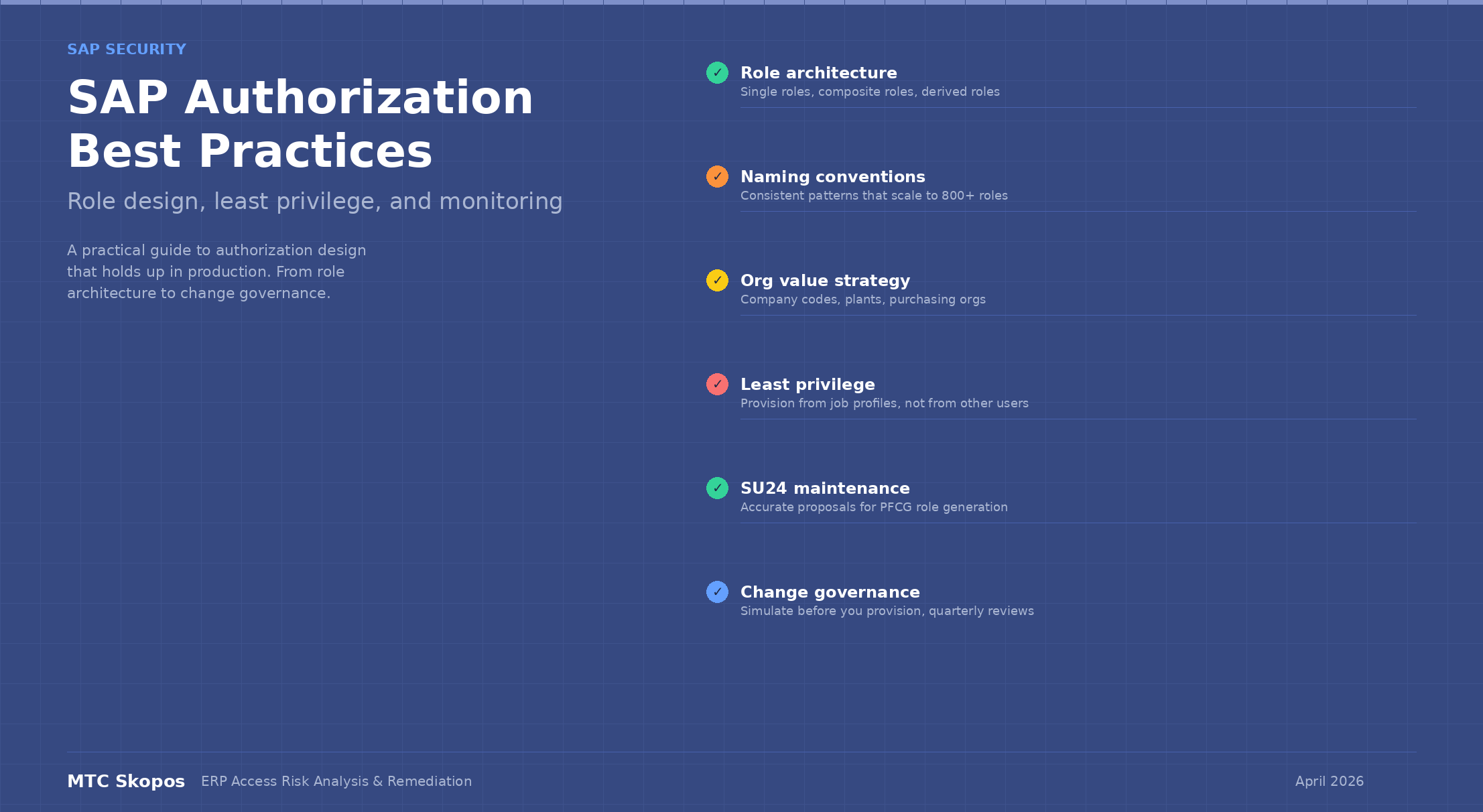
SAP Authorization Best Practices
SAP authorization controls what each user can do in your SAP system: which transactions they can run, which organizational data they can see, and which operations they can perform. Get it right and your system passes audit cleanly. Get it wrong and you spend every quarter explaining hundreds of SoD conflicts.
This guide covers what actually works in production when you have hundreds of roles, thousands of users, and an audit coming up.
Role architecture: single roles, composite roles, and how they fit together
Get role design wrong and everything downstream (SoD analysis, user provisioning, access reviews) becomes harder than it needs to be.
Single roles contain the actual authorization data: transaction codes, authorization objects, and organizational values. Each single role should represent one job function in one organizational scope.
Composite roles bundle single roles together for assignment. They contain no authorization data themselves. They exist to simplify provisioning by grouping the single roles that make up a job profile.
The mistake most organizations make: building large single roles that cover multiple functions. A role called Z_FI_USER that includes AP posting, AR posting, asset management, and bank reconciliation is not a role. It is an SoD conflict waiting to happen.
Instead, break it down:
| Role | Function | Scope |
|---|---|---|
| Z_FI_1000_AP_POST | AP invoice posting | Company code 1000 |
| Z_FI_1000_AP_PAY | Payment execution | Company code 1000 |
| Z_FI_1000_AR_POST | AR invoice posting | Company code 1000 |
| Z_FI_1000_GL_POST | G/L journal entries | Company code 1000 |
Then create composite roles like Z_C_FI_1000_AP_CLERK that bundles only the single roles an AP clerk actually needs. When a user moves teams or picks up new responsibilities, you add or remove single roles from their composite. You never need to modify the single roles themselves.
This approach makes SoD analysis cleaner because each single role maps to a clearly defined function. When a conflict appears, you know exactly which role is responsible.
Naming conventions that scale
A role naming convention sounds like bureaucracy until you have 800 roles and nobody can tell what half of them do.
A good naming convention encodes four things: role type, module, organizational scope, and function.
Pattern: Z_<type>_<module>_<org>_<function>
| Component | Example values | Purpose |
|---|---|---|
| Type | (none) for single, C for composite, D for derived | Tells you what kind of role it is at a glance |
| Module | FI, MM, SD, HR, BASIS | Groups roles by functional area |
| Org | 1000, DE01, GLOBAL | Shows which company code, plant, or region |
| Function | AP_POST, PO_CREATE, VENDOR_MAINT | Describes what the role allows |
Examples:
Z_MM_1000_PO_CREATE— single role, MM module, company code 1000, purchase order creationZ_C_MM_1000_BUYER— composite role bundling the single roles for a buyer in company code 1000Z_D_FI_2000_AP_POST— derived role for AP posting in company code 2000 (derived from the 1000 template)
Do not use names like Z_JOHN_SMITH_ROLE or Z_FINANCE_TEMP_2. These tell you nothing and will haunt you during the next audit.
Organizational value strategy
Organizational values — company codes, plants, purchasing organizations, sales organizations — are where authorization design gets tricky. The question is always: how do you scope roles to the right organizational units without creating an unmanageable number of roles?
Derived roles are the standard answer. You build a master single role with all the functional authorizations and leave organizational values blank. Then you derive copies for each organizational scope, filling in the specific values. When the functional scope changes, you update the master and propagate.
This works well for organizations with clean, predictable organizational structures. It falls apart when:
- Users need access across multiple company codes with different function combinations
- Organizational structures are inconsistent across modules (plant 1000 exists in MM but not in SD)
- Mergers and acquisitions create temporary hybrid access patterns
In these cases, be pragmatic. Use derived roles where the pattern is clean and fall back to explicit single roles where it is not. Consistency within a module matters more than consistency across modules.
One rule that should never bend: do not use star (*) values in organizational fields. A user who needs access to company codes 1000 and 2000 should have those values explicitly listed, not a wildcard that also gives them access to 3000, 4000, and every company code created next year.
Least privilege in practice
The principle of least privilege says users should have only the access they need. Everyone agrees with this. Very few organizations actually enforce it, and the result is privilege creep: the gradual accumulation of access that no longer reflects what a user actually does.
The most common way it starts: a new user joins and their manager says "give them the same access as Maria." Maria has been there 12 years and accumulated access from three different positions. The new hire starts day one with far more access than they need. Provision from job profiles (composite roles designed for specific positions), not from other users.
Then there is access that never gets removed. Users change teams, projects end, temporary access becomes permanent. Without regular reviews, access only grows. Run did-do analysis quarterly. Compare what users can do (their authorizations) against what they actually did (their transaction usage). Roles unused for 90+ days deserve a question. Roles unused for 180+ days should be removed or explicitly justified.
And the classic shortcut: when a user gets an authorization error, someone sets the failing authorization object to *. Problem solved today, risk created for the next three years. Check the actual required values in SU53 (authorization failure analysis) and set only those. Maintain SU24 proposal values so that PFCG generates accurate authorizations from the start.
SU24: the most neglected configuration
SU24 defines which authorization objects are checked for each transaction code and what the default values should be. When you add a transaction code to a role in PFCG, the authorization objects that appear (and their default values) come from SU24.
If SU24 is not maintained:
- PFCG generates incomplete roles (missing authorization objects)
- Administrators manually add authorization objects without understanding what's needed
- SoD analysis tools may miss conflicts because they rely on SU24 to map transactions to authorization objects
- Role maintenance becomes guesswork instead of a structured process
Maintaining SU24 is not glamorous work. It involves running SU24 trace analysis for each transaction code, reviewing which authorization objects are actually checked at runtime, and updating the proposals accordingly. But skip it and you are building roles on bad data.
For S/4HANA, this includes maintaining SU24 entries for Fiori apps and OData services, not just classic transaction codes. See our guide on building a ruleset for S/4HANA for the specific authorization objects involved.
Critical access monitoring
Not all authorization risks are SoD conflicts. Some transactions and authorization values are risky on their own. They do not need a conflicting second function to cause damage.
Critical access includes:
| Category | Examples | Risk |
|---|---|---|
| Debugging in production | SA38, SE38 with debug authorization | Bypass all authorization checks |
| Direct table maintenance | SE16, SM30 with edit mode | Modify any data without application controls |
| User administration | SU01, PFCG, SU10 | Create users or modify roles to escalate own privileges |
| RFC management | SM59, SE37 with RFC execution | Execute remote function modules, potential for data extraction |
| Client copy / system admin | SCC4, SCC5, SE06 | Copy or modify entire client data |
| Batch job scheduling | SM36 with broad authorization | Schedule programs to run with elevated privileges |
These should be restricted to a small number of named administrators with documented justification. Run a critical access report regularly. Any user outside the approved list who holds these authorizations needs to be reviewed.
Tools like MTC Skopos run both SoD and critical access analysis in a single pass, so you do not need to maintain separate monitoring processes.
S/4HANA-specific considerations
If you are moving from ECC to S/4HANA, your authorization model needs to account for several changes.
Users access Fiori apps through catalogs and groups. The authorization chain runs from the Fiori launchpad through ICF service nodes to OData services and finally to backend authorization objects. Each layer needs to be configured correctly, and missing any one of them results in access errors that are harder to diagnose than classic authorization failures.
S/4HANA also replaces separate vendor masters (FK01/XK01) and customer masters (FD01/XD01) with the Business Partner (BP transaction). Authorization objects change accordingly: B_BUPA_GRP, B_BUPA_RLT, and B_BUPA_FDG replace the legacy F_LFA1 and F_KNA1 objects. Your SoD ruleset needs to reflect these new objects.
Many classic transaction codes still work in S/4HANA but some are removed or replaced. Make sure your roles reference the correct transactions for your release and that SU24 is maintained for both Fiori and classic access paths.
One area that catches people off guard: embedded analytics. S/4HANA includes CDS view-based analytics with their own authorization objects (S_RFC for OData, S_SERVICE for service access). Users running reports through analytical Fiori apps need these authorizations, which creates new combinations to check for SoD conflicts.
Change governance
A clean authorization landscape does not stay clean on its own. Without governance around role changes, every access request and every transport slowly erodes your design.
Role change requests need a defined workflow. A business user requests access, their manager approves, and a security administrator implements. The administrator checks the impact on SoD before activating the change, not after.
Before assigning a role to a user, run a simulation to check whether the assignment creates new SoD conflicts. MTC Skopos supports this: you simulate the assignment, review the conflicts, and decide before the user ever gets the access.
Every quarter, review a report of user access against SoD and critical access rules. Managers confirm that their team members still need the access they have. Anything that cannot be justified gets removed or mitigated. Beyond the regular quarterly cycle, trigger an immediate review when something changes: a user switches teams, a contractor's engagement ends, or an organizational restructuring moves people between functions. These transitions are where privilege creep happens fastest, because the old access stays while the new access gets added.
Provisioning and deprovisioning should also tie to HR events. When someone is hired, they get access based on their job profile. When they change roles, their old access gets reviewed. When they leave, their access gets removed the same day. If your HR system and SAP are not connected through an identity management process, these transitions fall through the cracks and you end up with terminated employees who still have active SAP accounts.
Once a year, review the role catalog itself. Roles assigned to zero users can be archived. Roles with overlapping scope can be consolidated. Without this, the role catalog grows every year and never shrinks.
Putting it into practice
If you are starting from scratch or cleaning up an existing landscape, here is a practical sequence:
-
Run a full SoD and critical access analysis on your current state. You need to know what you are working with before redesigning anything.
-
Define your role architecture: naming conventions, single vs. composite structure, organizational value strategy. Document it. Get agreement from the team that will maintain it.
-
Redesign roles starting with the highest-risk areas (typically finance and procurement). Use MTC Skopos simulation to validate that new role designs do not introduce conflicts.
-
Maintain SU24 for every transaction code and Fiori app in your role catalog. This pays for itself in reduced role maintenance effort.
-
Implement change governance: simulation before provisioning, quarterly access reviews, annual role cleanup.
-
Monitor continuously. SoD analysis is not a one-time project. New roles get created, users accumulate access, and the landscape drifts. Checking before each change goes live is what keeps it from drifting back.
If your landscape is large or your team needs support, our consulting team offers authorization concept design, role redesign, and SoD remediation services.